> ## Documentation Index
> Fetch the complete documentation index at: https://docs-dev-actions-triggers-reorg.mintlify.site/llms.txt
> Use this file to discover all available pages before exploring further.

> Learn how to configure an update policy form using Forms for Actions for users to review and accept new terms of service or consent updates.

# Use Cases: Configure an update policy form using Forms

<Card title="Before you start">
  1. Create a [Machine-to-Machine Application](/docs/get-started/auth0-overview/create-applications/machine-to-machine-apps) with the following scopes enabled:

  * `read:users`
  * `update:users`
  * `create:users`
  * `read:users_app_metadata`
  * `update:users_app_metadata`
  * `create:users_app_metadata`

  2. Add a [Vault connection](/docs/customize/forms/vault) using the M2M application credentials.
</Card>

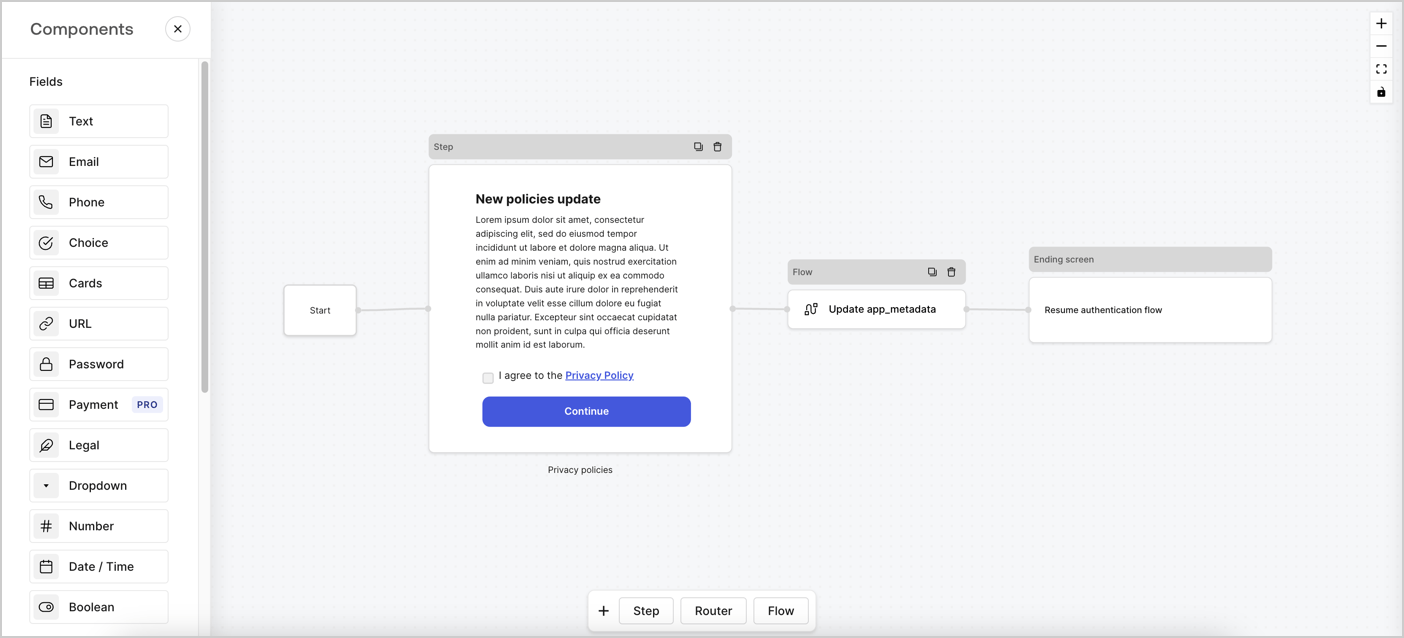
Forms for Actions allows you to create custom privacy policies flows and store the consent under the `app_metadata` object.
<Frame>
  <img src="https://mintcdn.com/docs-dev-actions-triggers-reorg/EUlzT1WYzKXF0diC/docs/images/cdy7uua7fh8z/6i68dMvHDTijfRmSgN1x8Q/ad900e7d4c0fb34645921435472b8684/privavy-policy-form.png?fit=max&auto=format&n=EUlzT1WYzKXF0diC&q=85&s=b28aadbd1fe400e576e8e7dcc4922b74" alt="Dashboard > Actions > Forms > Privacy policy use case" data-og-width="1404" width="1404" data-og-height="638" height="638" data-path="docs/images/cdy7uua7fh8z/6i68dMvHDTijfRmSgN1x8Q/ad900e7d4c0fb34645921435472b8684/privavy-policy-form.png" data-optimize="true" data-opv="3" srcset="https://mintcdn.com/docs-dev-actions-triggers-reorg/EUlzT1WYzKXF0diC/docs/images/cdy7uua7fh8z/6i68dMvHDTijfRmSgN1x8Q/ad900e7d4c0fb34645921435472b8684/privavy-policy-form.png?w=280&fit=max&auto=format&n=EUlzT1WYzKXF0diC&q=85&s=1beb295ce8ee326a13e79d5322287c7d 280w, https://mintcdn.com/docs-dev-actions-triggers-reorg/EUlzT1WYzKXF0diC/docs/images/cdy7uua7fh8z/6i68dMvHDTijfRmSgN1x8Q/ad900e7d4c0fb34645921435472b8684/privavy-policy-form.png?w=560&fit=max&auto=format&n=EUlzT1WYzKXF0diC&q=85&s=b425ce0e7579767bbf431c40eb02af81 560w, https://mintcdn.com/docs-dev-actions-triggers-reorg/EUlzT1WYzKXF0diC/docs/images/cdy7uua7fh8z/6i68dMvHDTijfRmSgN1x8Q/ad900e7d4c0fb34645921435472b8684/privavy-policy-form.png?w=840&fit=max&auto=format&n=EUlzT1WYzKXF0diC&q=85&s=63241dfb9dc448553c7ca93afb905a7a 840w, https://mintcdn.com/docs-dev-actions-triggers-reorg/EUlzT1WYzKXF0diC/docs/images/cdy7uua7fh8z/6i68dMvHDTijfRmSgN1x8Q/ad900e7d4c0fb34645921435472b8684/privavy-policy-form.png?w=1100&fit=max&auto=format&n=EUlzT1WYzKXF0diC&q=85&s=120f3bef5b2e08637d048e11b61b6575 1100w, https://mintcdn.com/docs-dev-actions-triggers-reorg/EUlzT1WYzKXF0diC/docs/images/cdy7uua7fh8z/6i68dMvHDTijfRmSgN1x8Q/ad900e7d4c0fb34645921435472b8684/privavy-policy-form.png?w=1650&fit=max&auto=format&n=EUlzT1WYzKXF0diC&q=85&s=71cfdce089d1f6c4bf37cda8b628fbb5 1650w, https://mintcdn.com/docs-dev-actions-triggers-reorg/EUlzT1WYzKXF0diC/docs/images/cdy7uua7fh8z/6i68dMvHDTijfRmSgN1x8Q/ad900e7d4c0fb34645921435472b8684/privavy-policy-form.png?w=2500&fit=max&auto=format&n=EUlzT1WYzKXF0diC&q=85&s=ac7c41ed5e14e8af078e1e738893f899 2500w" />
</Frame>

The sections below outline how you can create an Update Policy form using nodes and flows, along with steps for adding your form to a [Post Login](/docs/customize/actions/explore-triggers/signup-and-login-triggers/login-trigger) Action.

## Create a form from scratch

Follow these steps to create a form to gather information:

1. Open the Form editor by selecting **Auth0 Dashboard > Actions > Forms.**
2. Select **Create Form** > **Start from scratch**.

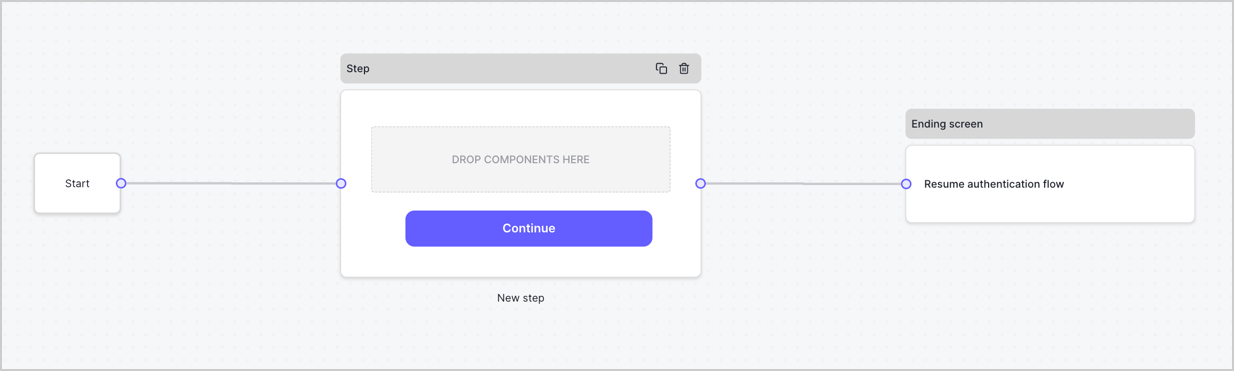
By default, a new form contains a Start node, a Step node, and an Ending screen node.
<Frame>
  <img src="https://mintcdn.com/docs-dev-actions-triggers-reorg/Nsx2jx0RUt5O7345/docs/images/cdy7uua7fh8z/2TZ9jSjgEcARFpULI6hz4R/a4319a1bd482f2ee5cc23100fdb2f42c/New-form-Forms-for-action-use-case.png?fit=max&auto=format&n=Nsx2jx0RUt5O7345&q=85&s=53d17d19b3cdda3ebbe9725e18b19893" alt="Dashboard > Forms > Use Cases > Form" data-og-width="1234" width="1234" data-og-height="371" height="371" data-path="docs/images/cdy7uua7fh8z/2TZ9jSjgEcARFpULI6hz4R/a4319a1bd482f2ee5cc23100fdb2f42c/New-form-Forms-for-action-use-case.png" data-optimize="true" data-opv="3" srcset="https://mintcdn.com/docs-dev-actions-triggers-reorg/Nsx2jx0RUt5O7345/docs/images/cdy7uua7fh8z/2TZ9jSjgEcARFpULI6hz4R/a4319a1bd482f2ee5cc23100fdb2f42c/New-form-Forms-for-action-use-case.png?w=280&fit=max&auto=format&n=Nsx2jx0RUt5O7345&q=85&s=628f6c435513f32db2cf1db17372dd37 280w, https://mintcdn.com/docs-dev-actions-triggers-reorg/Nsx2jx0RUt5O7345/docs/images/cdy7uua7fh8z/2TZ9jSjgEcARFpULI6hz4R/a4319a1bd482f2ee5cc23100fdb2f42c/New-form-Forms-for-action-use-case.png?w=560&fit=max&auto=format&n=Nsx2jx0RUt5O7345&q=85&s=df373b668401a80b07cbd85f50e5b595 560w, https://mintcdn.com/docs-dev-actions-triggers-reorg/Nsx2jx0RUt5O7345/docs/images/cdy7uua7fh8z/2TZ9jSjgEcARFpULI6hz4R/a4319a1bd482f2ee5cc23100fdb2f42c/New-form-Forms-for-action-use-case.png?w=840&fit=max&auto=format&n=Nsx2jx0RUt5O7345&q=85&s=4fa51a69c8067b16b1580fbb0f144c15 840w, https://mintcdn.com/docs-dev-actions-triggers-reorg/Nsx2jx0RUt5O7345/docs/images/cdy7uua7fh8z/2TZ9jSjgEcARFpULI6hz4R/a4319a1bd482f2ee5cc23100fdb2f42c/New-form-Forms-for-action-use-case.png?w=1100&fit=max&auto=format&n=Nsx2jx0RUt5O7345&q=85&s=af9cbf0a03eb3c57d21130569031ae97 1100w, https://mintcdn.com/docs-dev-actions-triggers-reorg/Nsx2jx0RUt5O7345/docs/images/cdy7uua7fh8z/2TZ9jSjgEcARFpULI6hz4R/a4319a1bd482f2ee5cc23100fdb2f42c/New-form-Forms-for-action-use-case.png?w=1650&fit=max&auto=format&n=Nsx2jx0RUt5O7345&q=85&s=508f36454bc847523500a30956d80b3c 1650w, https://mintcdn.com/docs-dev-actions-triggers-reorg/Nsx2jx0RUt5O7345/docs/images/cdy7uua7fh8z/2TZ9jSjgEcARFpULI6hz4R/a4319a1bd482f2ee5cc23100fdb2f42c/New-form-Forms-for-action-use-case.png?w=2500&fit=max&auto=format&n=Nsx2jx0RUt5O7345&q=85&s=27e0989b3f0502f1a8877d0bef7590c9 2500w" />
</Frame>

### Configure the Step node

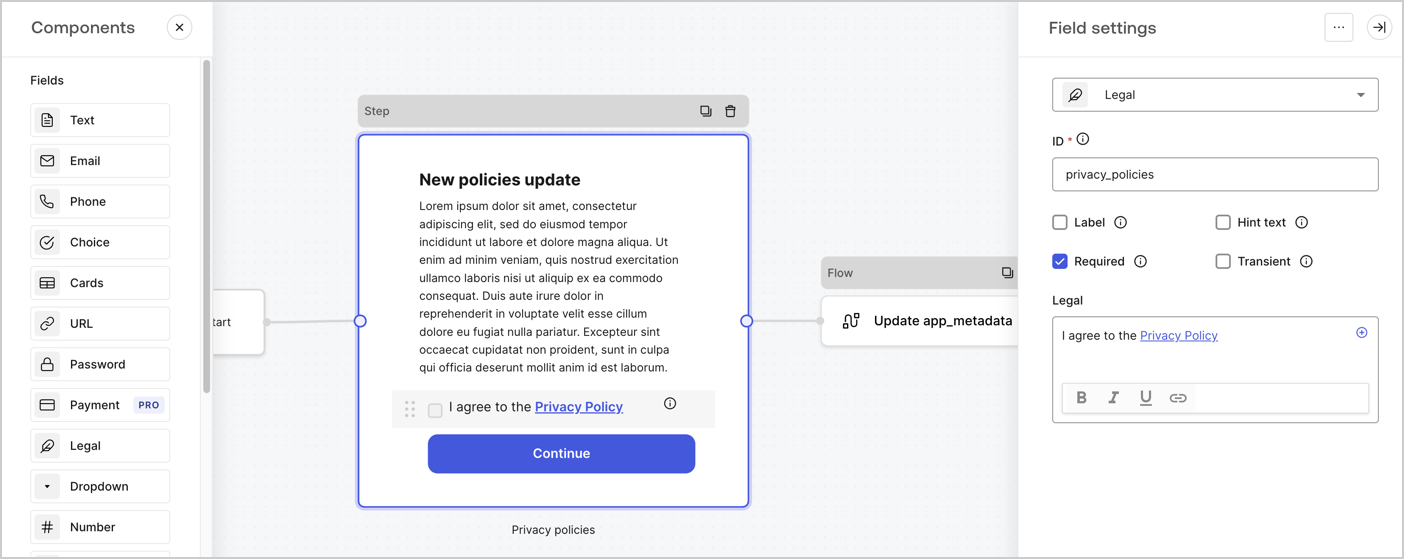
The Step node is the graphical interface visible to users. Add [Fields](/docs/customize/forms/nodes-and-components) to the Step node to collect the new agreement acceptance value by following these steps:

1. Drag a **Rich text** field from the **Components menu** into the **Step** node.

   * **Rich text**: Enter a description of your privacy policies updates.
   * Select **Save**.
2. Drag a **Legal** field into the **Step** node.

   * **ID**: Enter `privacy_policies`.
   * **Required**: Enable the checkbox.
   * **Legal**: Enter `I agree to the Privacy Policy`.
   * Select **Save**.
3. Select **Publish** to save.
<Frame>
  <img src="https://mintcdn.com/docs-dev-actions-triggers-reorg/kNefQmNXVFylVFt5/docs/images/cdy7uua7fh8z/59zFFjQjAnjogkc2QGIqqJ/0ad66b1b636544122aa4e65968b76c2c/privacy-policy-step-node.png?fit=max&auto=format&n=kNefQmNXVFylVFt5&q=85&s=b02c96649b0c42bb7c76caf567ebba4d" alt="Dashboard > Actions > Forms > Use case privacy policy step node" data-og-width="1404" width="1404" data-og-height="559" height="559" data-path="docs/images/cdy7uua7fh8z/59zFFjQjAnjogkc2QGIqqJ/0ad66b1b636544122aa4e65968b76c2c/privacy-policy-step-node.png" data-optimize="true" data-opv="3" srcset="https://mintcdn.com/docs-dev-actions-triggers-reorg/kNefQmNXVFylVFt5/docs/images/cdy7uua7fh8z/59zFFjQjAnjogkc2QGIqqJ/0ad66b1b636544122aa4e65968b76c2c/privacy-policy-step-node.png?w=280&fit=max&auto=format&n=kNefQmNXVFylVFt5&q=85&s=46822bd0690cb8e30ac6cf2b05c9f319 280w, https://mintcdn.com/docs-dev-actions-triggers-reorg/kNefQmNXVFylVFt5/docs/images/cdy7uua7fh8z/59zFFjQjAnjogkc2QGIqqJ/0ad66b1b636544122aa4e65968b76c2c/privacy-policy-step-node.png?w=560&fit=max&auto=format&n=kNefQmNXVFylVFt5&q=85&s=07cf19687bbd064afeb5f5157b2cd14b 560w, https://mintcdn.com/docs-dev-actions-triggers-reorg/kNefQmNXVFylVFt5/docs/images/cdy7uua7fh8z/59zFFjQjAnjogkc2QGIqqJ/0ad66b1b636544122aa4e65968b76c2c/privacy-policy-step-node.png?w=840&fit=max&auto=format&n=kNefQmNXVFylVFt5&q=85&s=89fcd38b5450a8700ae1bf3d36fd5c0a 840w, https://mintcdn.com/docs-dev-actions-triggers-reorg/kNefQmNXVFylVFt5/docs/images/cdy7uua7fh8z/59zFFjQjAnjogkc2QGIqqJ/0ad66b1b636544122aa4e65968b76c2c/privacy-policy-step-node.png?w=1100&fit=max&auto=format&n=kNefQmNXVFylVFt5&q=85&s=25c4e8b7d4ff2426c00badb2d491688b 1100w, https://mintcdn.com/docs-dev-actions-triggers-reorg/kNefQmNXVFylVFt5/docs/images/cdy7uua7fh8z/59zFFjQjAnjogkc2QGIqqJ/0ad66b1b636544122aa4e65968b76c2c/privacy-policy-step-node.png?w=1650&fit=max&auto=format&n=kNefQmNXVFylVFt5&q=85&s=decb43e17d69429ce8db60887aa39b30 1650w, https://mintcdn.com/docs-dev-actions-triggers-reorg/kNefQmNXVFylVFt5/docs/images/cdy7uua7fh8z/59zFFjQjAnjogkc2QGIqqJ/0ad66b1b636544122aa4e65968b76c2c/privacy-policy-step-node.png?w=2500&fit=max&auto=format&n=kNefQmNXVFylVFt5&q=85&s=d6ea55d71b769b159cf7134404a09614 2500w" />
</Frame>

### Configure the Flow node

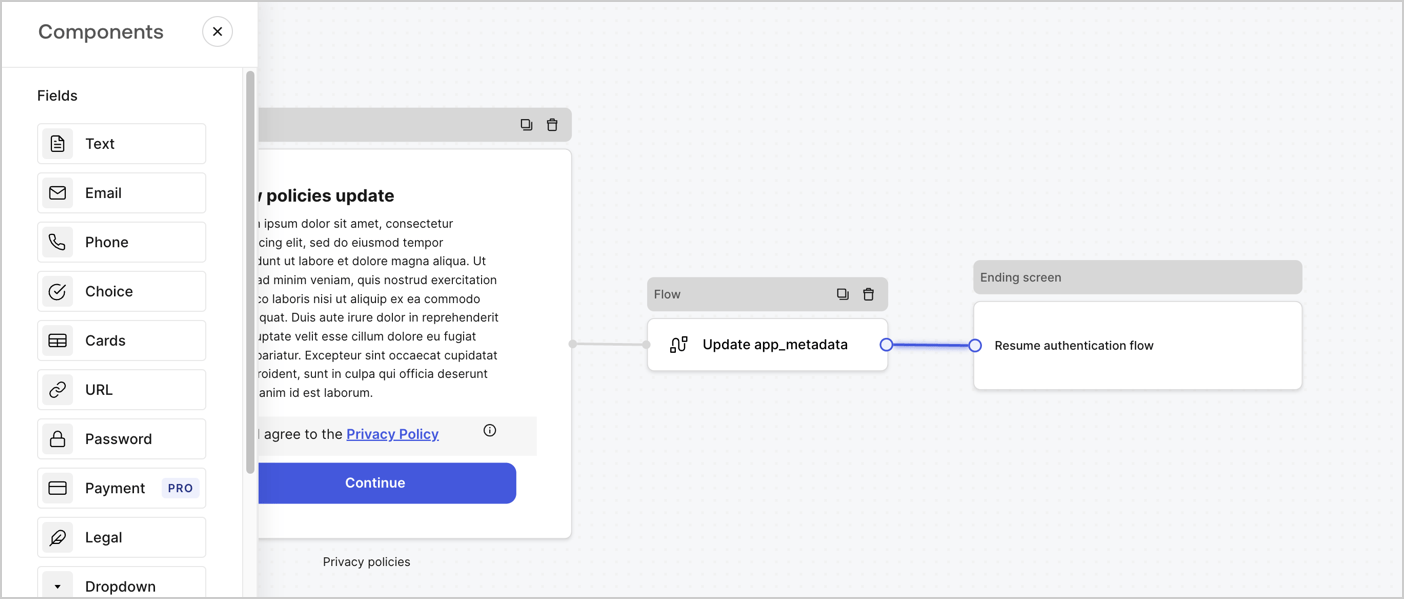
Add a **Flow** node after the **Step** node to update the `app_metadata` and resume the authentication flow by following these steps:

1. Select **Flow** from the bottom of the Form editor.
2. Remove the existing link between the **Step** and **Ending Screen** nodes.
3. Select the new **Flow** > **Click to add a flow** > **Create a new flow.**

   * Enter `Update app_metadata` in the **Name** field.
   * Select **Create**.
   * Select **Save**.
4. Link the **Flow** node to the **Step** and **Ending Screen** nodes as pictured below.
5. Select **Publish** to save.
<Frame>
  <img src="https://mintcdn.com/docs-dev-actions-triggers-reorg/EUlzT1WYzKXF0diC/docs/images/cdy7uua7fh8z/6YIkzm7SrpM9LW76AXuRzh/353c518fe82bbaa440836da1d83596d6/link-policies.png?fit=max&auto=format&n=EUlzT1WYzKXF0diC&q=85&s=6cbcd137d3ca7ca7ebcf594795eaa3b2" alt="Dashboard > Actions > Forms > Form" data-og-width="1404" width="1404" data-og-height="599" height="599" data-path="docs/images/cdy7uua7fh8z/6YIkzm7SrpM9LW76AXuRzh/353c518fe82bbaa440836da1d83596d6/link-policies.png" data-optimize="true" data-opv="3" srcset="https://mintcdn.com/docs-dev-actions-triggers-reorg/EUlzT1WYzKXF0diC/docs/images/cdy7uua7fh8z/6YIkzm7SrpM9LW76AXuRzh/353c518fe82bbaa440836da1d83596d6/link-policies.png?w=280&fit=max&auto=format&n=EUlzT1WYzKXF0diC&q=85&s=9e5179e65044ce12195af0187ddd401c 280w, https://mintcdn.com/docs-dev-actions-triggers-reorg/EUlzT1WYzKXF0diC/docs/images/cdy7uua7fh8z/6YIkzm7SrpM9LW76AXuRzh/353c518fe82bbaa440836da1d83596d6/link-policies.png?w=560&fit=max&auto=format&n=EUlzT1WYzKXF0diC&q=85&s=e104852b005975cc37f5dfe8aff62b2a 560w, https://mintcdn.com/docs-dev-actions-triggers-reorg/EUlzT1WYzKXF0diC/docs/images/cdy7uua7fh8z/6YIkzm7SrpM9LW76AXuRzh/353c518fe82bbaa440836da1d83596d6/link-policies.png?w=840&fit=max&auto=format&n=EUlzT1WYzKXF0diC&q=85&s=8f58979a881ae91280bd0d80029a2bd8 840w, https://mintcdn.com/docs-dev-actions-triggers-reorg/EUlzT1WYzKXF0diC/docs/images/cdy7uua7fh8z/6YIkzm7SrpM9LW76AXuRzh/353c518fe82bbaa440836da1d83596d6/link-policies.png?w=1100&fit=max&auto=format&n=EUlzT1WYzKXF0diC&q=85&s=50dd3e89f95d26e23bec48ce3410ad8b 1100w, https://mintcdn.com/docs-dev-actions-triggers-reorg/EUlzT1WYzKXF0diC/docs/images/cdy7uua7fh8z/6YIkzm7SrpM9LW76AXuRzh/353c518fe82bbaa440836da1d83596d6/link-policies.png?w=1650&fit=max&auto=format&n=EUlzT1WYzKXF0diC&q=85&s=1b91d7cf8765d98c4120198e3543c26f 1650w, https://mintcdn.com/docs-dev-actions-triggers-reorg/EUlzT1WYzKXF0diC/docs/images/cdy7uua7fh8z/6YIkzm7SrpM9LW76AXuRzh/353c518fe82bbaa440836da1d83596d6/link-policies.png?w=2500&fit=max&auto=format&n=EUlzT1WYzKXF0diC&q=85&s=362a98d895d33efbe51903a522f8a3f0 2500w" />
</Frame>

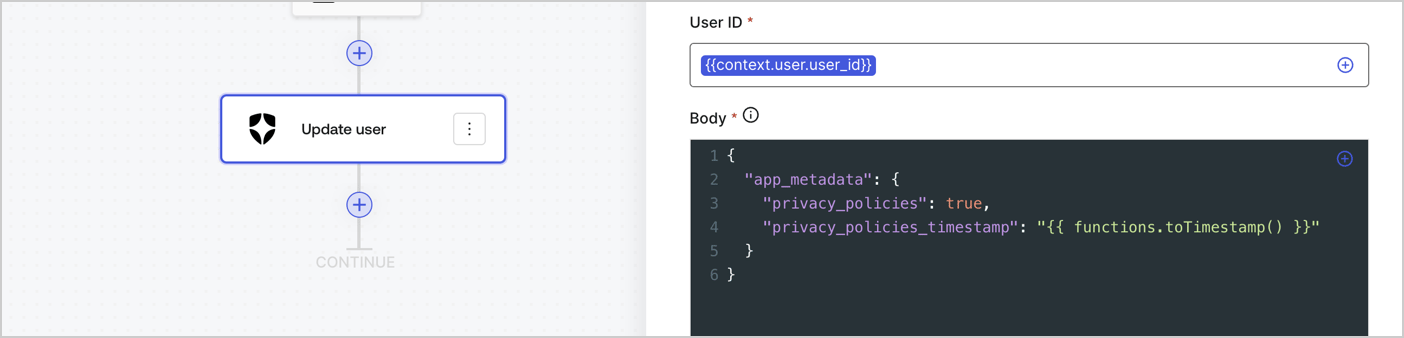
Add an Auth0 Update user action to the flow by following these steps:

1. Select the **Flow** **Update app\_metadata** > **Edit flow** to open the Flow editor in a new tab.
2. Below the StartAction, select the **+** icon to add an **Update user** action. Complete the fields below, then select **Save** to continue.

   * **Connection**: Select from the dropdown the Vault connection to your M2M application.

   * **User ID**: Enter `{{context.user.user_id}}`.

   * **Body**: Copy and paste the following code to update the app\_metadata with the privacy\_policies and privacy\_policies\_timestamp properties.

     ```text lines theme={null}
     {
       "app_metadata": {
         "privacy_policies": true,
         "privacy_policies_timestamp": "{{ functions.toTimestamp() }}"
       }
     }
     ```

   * Select **Save**.
3. Select **Publish** to save.
<Frame>
  <img src="https://mintcdn.com/docs-dev-actions-triggers-reorg/f9k66KajacwTrGCw/docs/images/cdy7uua7fh8z/CvMNIwWrOUwaFW4X3G28p/1fb70ae57a20749d9ffaaba8dc0b7e26/update-user-privacy.png?fit=max&auto=format&n=f9k66KajacwTrGCw&q=85&s=ee0a777bed8b943f12884821e7b59432" alt="Dashboard > Actions > Forms > User case privacy policy code" data-og-width="1404" width="1404" data-og-height="338" height="338" data-path="docs/images/cdy7uua7fh8z/CvMNIwWrOUwaFW4X3G28p/1fb70ae57a20749d9ffaaba8dc0b7e26/update-user-privacy.png" data-optimize="true" data-opv="3" srcset="https://mintcdn.com/docs-dev-actions-triggers-reorg/f9k66KajacwTrGCw/docs/images/cdy7uua7fh8z/CvMNIwWrOUwaFW4X3G28p/1fb70ae57a20749d9ffaaba8dc0b7e26/update-user-privacy.png?w=280&fit=max&auto=format&n=f9k66KajacwTrGCw&q=85&s=91d16eb11708cedb9133cd56857bd36c 280w, https://mintcdn.com/docs-dev-actions-triggers-reorg/f9k66KajacwTrGCw/docs/images/cdy7uua7fh8z/CvMNIwWrOUwaFW4X3G28p/1fb70ae57a20749d9ffaaba8dc0b7e26/update-user-privacy.png?w=560&fit=max&auto=format&n=f9k66KajacwTrGCw&q=85&s=711687d599c6f03967b35de2724066a0 560w, https://mintcdn.com/docs-dev-actions-triggers-reorg/f9k66KajacwTrGCw/docs/images/cdy7uua7fh8z/CvMNIwWrOUwaFW4X3G28p/1fb70ae57a20749d9ffaaba8dc0b7e26/update-user-privacy.png?w=840&fit=max&auto=format&n=f9k66KajacwTrGCw&q=85&s=78632f6998252cacbb14849daf08baf3 840w, https://mintcdn.com/docs-dev-actions-triggers-reorg/f9k66KajacwTrGCw/docs/images/cdy7uua7fh8z/CvMNIwWrOUwaFW4X3G28p/1fb70ae57a20749d9ffaaba8dc0b7e26/update-user-privacy.png?w=1100&fit=max&auto=format&n=f9k66KajacwTrGCw&q=85&s=d2092baece41d727d340e5a471ad9b34 1100w, https://mintcdn.com/docs-dev-actions-triggers-reorg/f9k66KajacwTrGCw/docs/images/cdy7uua7fh8z/CvMNIwWrOUwaFW4X3G28p/1fb70ae57a20749d9ffaaba8dc0b7e26/update-user-privacy.png?w=1650&fit=max&auto=format&n=f9k66KajacwTrGCw&q=85&s=1dd5eebdd4373d32de33cac88626d868 1650w, https://mintcdn.com/docs-dev-actions-triggers-reorg/f9k66KajacwTrGCw/docs/images/cdy7uua7fh8z/CvMNIwWrOUwaFW4X3G28p/1fb70ae57a20749d9ffaaba8dc0b7e26/update-user-privacy.png?w=2500&fit=max&auto=format&n=f9k66KajacwTrGCw&q=85&s=d320b9c52961951cfe88ba52b420bf22 2500w" />
</Frame>

<Callout icon="file-lines" color="#0EA5E9" iconType="regular">
  The flow **Update app\_metadata** adds a `privacy_policies true` value to the app`_metadata` object and also generates a timestamp with a [helper function.](/docs/customize/forms/variables)
</Callout>

## Retrieve the form render code

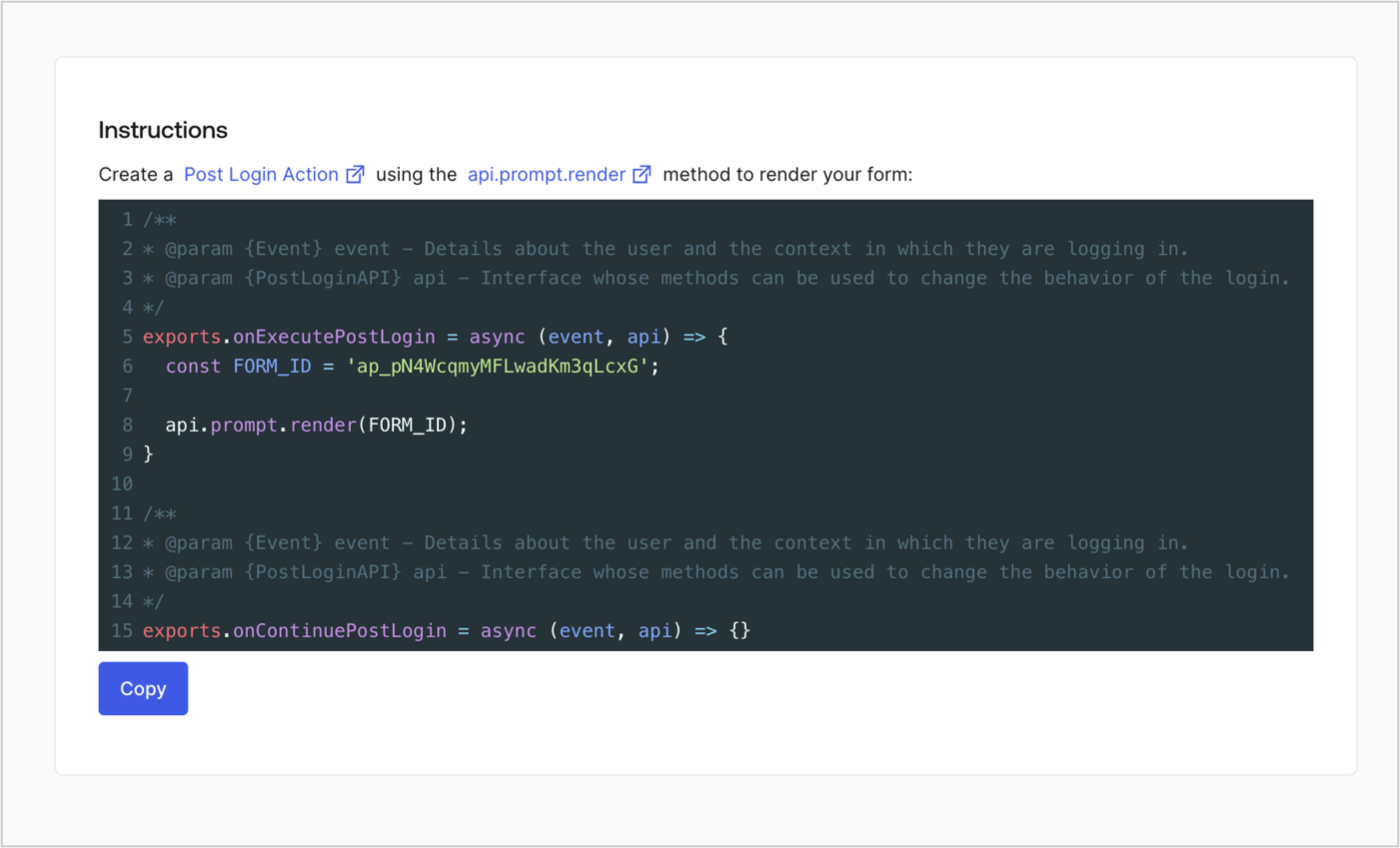
Retrieve your form render code to visually render the form with a custom Post Login Action by following these steps:

* From the Form editor, select **`<> Render`**.
* Select **Copy**.
<Frame>
  <img src="https://mintcdn.com/docs-dev-actions-triggers-reorg/IEyMmTX7ekKWhRz7/docs/images/cdy7uua7fh8z/2EIUzc539sq9lwoTKbjoJv/496a864c0fc44a782c9cadca119dbfb0/embed.png?fit=max&auto=format&n=IEyMmTX7ekKWhRz7&q=85&s=e046a3a1520f63b7755b6ca901d7e203" alt="Dashboard > Actions > Forms > Form > Embed" data-og-width="1400" width="1400" data-og-height="848" height="848" data-path="docs/images/cdy7uua7fh8z/2EIUzc539sq9lwoTKbjoJv/496a864c0fc44a782c9cadca119dbfb0/embed.png" data-optimize="true" data-opv="3" srcset="https://mintcdn.com/docs-dev-actions-triggers-reorg/IEyMmTX7ekKWhRz7/docs/images/cdy7uua7fh8z/2EIUzc539sq9lwoTKbjoJv/496a864c0fc44a782c9cadca119dbfb0/embed.png?w=280&fit=max&auto=format&n=IEyMmTX7ekKWhRz7&q=85&s=e426383af4eb556b695debb8715474cd 280w, https://mintcdn.com/docs-dev-actions-triggers-reorg/IEyMmTX7ekKWhRz7/docs/images/cdy7uua7fh8z/2EIUzc539sq9lwoTKbjoJv/496a864c0fc44a782c9cadca119dbfb0/embed.png?w=560&fit=max&auto=format&n=IEyMmTX7ekKWhRz7&q=85&s=3815f65f6bbe967021a35f23b1d664cc 560w, https://mintcdn.com/docs-dev-actions-triggers-reorg/IEyMmTX7ekKWhRz7/docs/images/cdy7uua7fh8z/2EIUzc539sq9lwoTKbjoJv/496a864c0fc44a782c9cadca119dbfb0/embed.png?w=840&fit=max&auto=format&n=IEyMmTX7ekKWhRz7&q=85&s=20ef7b417502c1f3f3d6235676a51117 840w, https://mintcdn.com/docs-dev-actions-triggers-reorg/IEyMmTX7ekKWhRz7/docs/images/cdy7uua7fh8z/2EIUzc539sq9lwoTKbjoJv/496a864c0fc44a782c9cadca119dbfb0/embed.png?w=1100&fit=max&auto=format&n=IEyMmTX7ekKWhRz7&q=85&s=b9e111cf921dbc3d2a1c4b1a9cfc29f6 1100w, https://mintcdn.com/docs-dev-actions-triggers-reorg/IEyMmTX7ekKWhRz7/docs/images/cdy7uua7fh8z/2EIUzc539sq9lwoTKbjoJv/496a864c0fc44a782c9cadca119dbfb0/embed.png?w=1650&fit=max&auto=format&n=IEyMmTX7ekKWhRz7&q=85&s=c2003a3f6c5c0d12f25d9e30f618613a 1650w, https://mintcdn.com/docs-dev-actions-triggers-reorg/IEyMmTX7ekKWhRz7/docs/images/cdy7uua7fh8z/2EIUzc539sq9lwoTKbjoJv/496a864c0fc44a782c9cadca119dbfb0/embed.png?w=2500&fit=max&auto=format&n=IEyMmTX7ekKWhRz7&q=85&s=4e3635a721239a16208c6f9e6b487d48 2500w" />
</Frame>

## Create a Post Login Action

Create a post-login Action to render your form by following these steps:

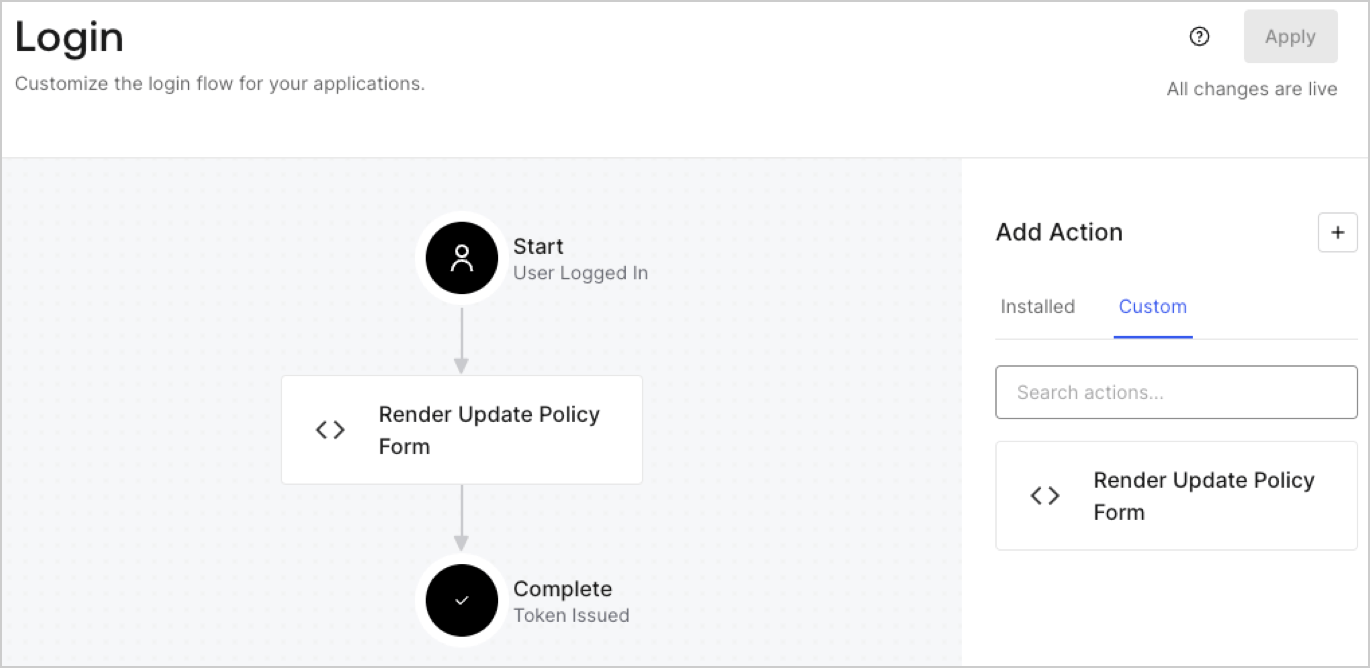
1. Navigate to **Auth0 Dashboard > Actions > Flows > Login.**
2. Select the **+** icon and Select **Build from scratch**:

   * **Name**: Enter `Render Update Policy Form`.
   * **Trigger**: Select `Login / Post Login`.
   * **Runtime**: Select the recommended version.
3. Select **Create**.

To configure the post-login Action:

1. Delete the existing code from the Code editor.
2. Paste the form render code into the Code editor.
3. Edit the code to define the conditional logic that will render the form.

   ```javascript lines theme={null}
   /**
   * @param {Event} event - Details about the user and the context in which they are logging in.
   * @param {PostLoginAPI} api - Interface whose methods can be used to change the behavior of the login.
   */
   exports.onExecutePostLogin = async (event, api) => {
     const FORM_ID = 'REPLACE_WITH_YOUR_FORM_ID';

     if (event.user.app_metadata.privacy_policies !== true) {
       api.prompt.render(FORM_ID);
     }
   }

   exports.onContinuePostLogin = async (event, api) => { }
   ```

   <Callout icon="file-lines" color="#0EA5E9" iconType="regular">
     The example code above will render the form when a user is missing the app metadata `privacy_policies` property.
   </Callout>
4. Select **Deploy.**
5. Drag and Drop the **Render Update Policy Form** Action to the **Login** flow.
   <Frame>
     <img src="https://mintcdn.com/docs-dev-actions-triggers-reorg/3JfQLHnSJBkLPrbc/docs/images/cdy7uua7fh8z/5TOwDgevZsBqd7yZynUYWU/41ca909dc3007aed4f40ff794a05efa5/postlogin.png?fit=max&auto=format&n=3JfQLHnSJBkLPrbc&q=85&s=bb9cf999b10db6aea85f3ecc631cb86c" alt="Dashboard > Forms > Use Case > Render update policy form login action" data-og-width="1370" width="1370" data-og-height="668" height="668" data-path="docs/images/cdy7uua7fh8z/5TOwDgevZsBqd7yZynUYWU/41ca909dc3007aed4f40ff794a05efa5/postlogin.png" data-optimize="true" data-opv="3" srcset="https://mintcdn.com/docs-dev-actions-triggers-reorg/3JfQLHnSJBkLPrbc/docs/images/cdy7uua7fh8z/5TOwDgevZsBqd7yZynUYWU/41ca909dc3007aed4f40ff794a05efa5/postlogin.png?w=280&fit=max&auto=format&n=3JfQLHnSJBkLPrbc&q=85&s=7b41c026c42e8f0d29372d1c3d7de2d5 280w, https://mintcdn.com/docs-dev-actions-triggers-reorg/3JfQLHnSJBkLPrbc/docs/images/cdy7uua7fh8z/5TOwDgevZsBqd7yZynUYWU/41ca909dc3007aed4f40ff794a05efa5/postlogin.png?w=560&fit=max&auto=format&n=3JfQLHnSJBkLPrbc&q=85&s=d3057302abe37c5bac96bda6f02b7dc2 560w, https://mintcdn.com/docs-dev-actions-triggers-reorg/3JfQLHnSJBkLPrbc/docs/images/cdy7uua7fh8z/5TOwDgevZsBqd7yZynUYWU/41ca909dc3007aed4f40ff794a05efa5/postlogin.png?w=840&fit=max&auto=format&n=3JfQLHnSJBkLPrbc&q=85&s=a1c9ffdfd47c3f8cd6e85027d8110246 840w, https://mintcdn.com/docs-dev-actions-triggers-reorg/3JfQLHnSJBkLPrbc/docs/images/cdy7uua7fh8z/5TOwDgevZsBqd7yZynUYWU/41ca909dc3007aed4f40ff794a05efa5/postlogin.png?w=1100&fit=max&auto=format&n=3JfQLHnSJBkLPrbc&q=85&s=23d3485431a95b4d1a92801356137eed 1100w, https://mintcdn.com/docs-dev-actions-triggers-reorg/3JfQLHnSJBkLPrbc/docs/images/cdy7uua7fh8z/5TOwDgevZsBqd7yZynUYWU/41ca909dc3007aed4f40ff794a05efa5/postlogin.png?w=1650&fit=max&auto=format&n=3JfQLHnSJBkLPrbc&q=85&s=8642e75f237bf9c373ed8c137859837d 1650w, https://mintcdn.com/docs-dev-actions-triggers-reorg/3JfQLHnSJBkLPrbc/docs/images/cdy7uua7fh8z/5TOwDgevZsBqd7yZynUYWU/41ca909dc3007aed4f40ff794a05efa5/postlogin.png?w=2500&fit=max&auto=format&n=3JfQLHnSJBkLPrbc&q=85&s=a82d93ea46cd6ae40e07fa9fe055ae15 2500w" />
   </Frame>
6. Select **Apply.**

### Test implementation

Test the implementation by following these steps:

1. Log in with an existing user whose app`_metadata` attribute `privacy_policies` does not have a value.
2. The post-login Action in the Login flow will render the form and prompt for acceptance.
3. Select **Auth0 Dashboard > User Management > Users,** locate the user and verify that the `app_metadata` attribute `privacy_policies` contains a `true` value and a timestamp.
