> ## Documentation Index
> Fetch the complete documentation index at: https://docs-dev-actions-triggers-reorg.mintlify.site/llms.txt
> Use this file to discover all available pages before exploring further.

> Learn how to add custom messages and translations to a Form so each step displays locale-specific copy that matches the language settings of the user.

# Custom Messages and Translation

You can  customize Form messages to provide your users with a unique Form experience. In addition, you can translate form components, errors, and other custom messages into other languages for a localized experience.

## Messages

Through the Form editor, you can customize error messages and create other custom messages for your users.

### Error messages

You can create custom error messages to replace the default error messages of your forms.

To create custom error messages, follow the steps below:

1. On the Auth0 Dashboard, navigate to **Actions > Forms**.
2. Select **Messages** from the left menu of the Form editor.
3. Select the **Errors** tab\*\*.\*\*
4. Enter your custom error messages in the appropriate fields to replace the default messages.
5. Select **Publish** to save.

### Custom messages

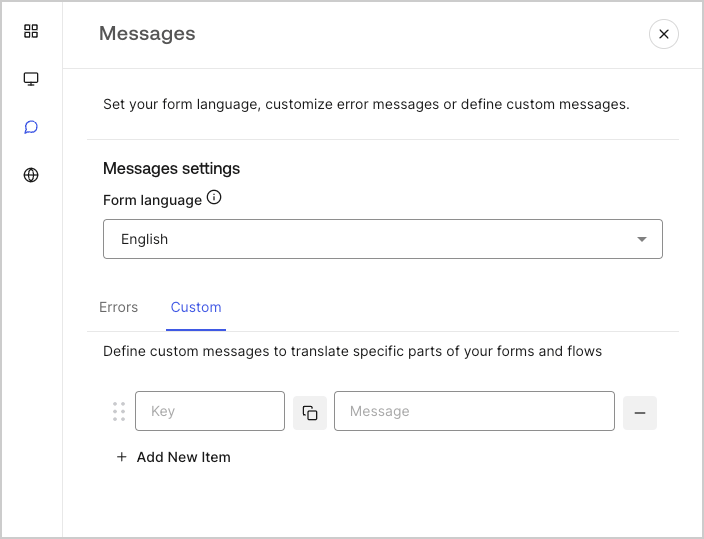
You can create custom messages to add to the default messages for an even further personalized Form experience. For example, you can add a custom message that displays to users when an action returns an error in a flow.

#### Create custom messages

To create custom messages, follow the steps below:

1. From the left menu of the Form editor, select **Messages**.
2. Select the **Custom** tab.Then, select **Add New Item**.
3. To the left, add a unique key for your message\*\*.\*\* Then\*\*, enter\*\* your custom message in the field to the right.
4. Select **Publish** to save.
<Frame>
  <img src="https://mintcdn.com/docs-dev-actions-triggers-reorg/IEyMmTX7ekKWhRz7/docs/images/cdy7uua7fh8z/1upBOwWqntPPQF8fqGeN6T/a65674d05c823c5fbe703265558693e4/custom-message.png?fit=max&auto=format&n=IEyMmTX7ekKWhRz7&q=85&s=e5468deb18c929c39e1dcfdb2cb59e5c" alt="Dashboard > Forms > Custom messages and translations > Custom message" data-og-width="704" width="704" data-og-height="539" height="539" data-path="docs/images/cdy7uua7fh8z/1upBOwWqntPPQF8fqGeN6T/a65674d05c823c5fbe703265558693e4/custom-message.png" data-optimize="true" data-opv="3" srcset="https://mintcdn.com/docs-dev-actions-triggers-reorg/IEyMmTX7ekKWhRz7/docs/images/cdy7uua7fh8z/1upBOwWqntPPQF8fqGeN6T/a65674d05c823c5fbe703265558693e4/custom-message.png?w=280&fit=max&auto=format&n=IEyMmTX7ekKWhRz7&q=85&s=da400fac84a49da0d95e5eff9c93ec36 280w, https://mintcdn.com/docs-dev-actions-triggers-reorg/IEyMmTX7ekKWhRz7/docs/images/cdy7uua7fh8z/1upBOwWqntPPQF8fqGeN6T/a65674d05c823c5fbe703265558693e4/custom-message.png?w=560&fit=max&auto=format&n=IEyMmTX7ekKWhRz7&q=85&s=a1e0e7022b3d5f8a232b9ac8669a808c 560w, https://mintcdn.com/docs-dev-actions-triggers-reorg/IEyMmTX7ekKWhRz7/docs/images/cdy7uua7fh8z/1upBOwWqntPPQF8fqGeN6T/a65674d05c823c5fbe703265558693e4/custom-message.png?w=840&fit=max&auto=format&n=IEyMmTX7ekKWhRz7&q=85&s=fd56e4c477f6619167eede6f06986e99 840w, https://mintcdn.com/docs-dev-actions-triggers-reorg/IEyMmTX7ekKWhRz7/docs/images/cdy7uua7fh8z/1upBOwWqntPPQF8fqGeN6T/a65674d05c823c5fbe703265558693e4/custom-message.png?w=1100&fit=max&auto=format&n=IEyMmTX7ekKWhRz7&q=85&s=1d674883435808bb612facb8aed4ba56 1100w, https://mintcdn.com/docs-dev-actions-triggers-reorg/IEyMmTX7ekKWhRz7/docs/images/cdy7uua7fh8z/1upBOwWqntPPQF8fqGeN6T/a65674d05c823c5fbe703265558693e4/custom-message.png?w=1650&fit=max&auto=format&n=IEyMmTX7ekKWhRz7&q=85&s=9dba95ccea3b8df749132eb52cef9d16 1650w, https://mintcdn.com/docs-dev-actions-triggers-reorg/IEyMmTX7ekKWhRz7/docs/images/cdy7uua7fh8z/1upBOwWqntPPQF8fqGeN6T/a65674d05c823c5fbe703265558693e4/custom-message.png?w=2500&fit=max&auto=format&n=IEyMmTX7ekKWhRz7&q=85&s=ddfddedc82a6d2b407e3082c85a3a2fd 2500w" />
</Frame>

#### Add custom messages to your forms

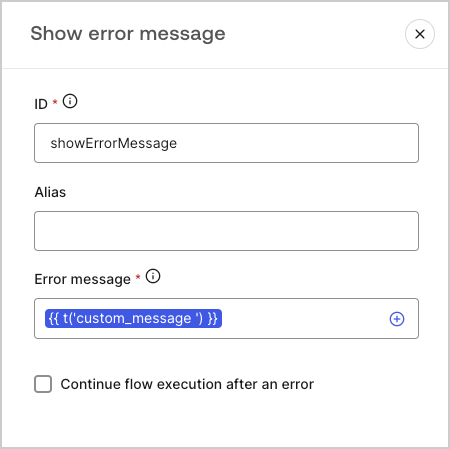
To reference your custom messages in your forms, use the function `{{t('custom_unique_key')}}` with the custom message unique key.
<Frame>
  <img src="https://mintcdn.com/docs-dev-actions-triggers-reorg/xf2VtLvVE75-w4nf/docs/images/cdy7uua7fh8z/45p4V7w5gw7DQZyJ08ECSH/d040720d9aa19f6e97e21defcd428e55/translation-function.png?fit=max&auto=format&n=xf2VtLvVE75-w4nf&q=85&s=10f347c5efad840f59df8615c3e45ab4" alt="Dashboard > Forms > Custom messages and translations > Translation function" data-og-width="450" width="450" data-og-height="449" height="449" data-path="docs/images/cdy7uua7fh8z/45p4V7w5gw7DQZyJ08ECSH/d040720d9aa19f6e97e21defcd428e55/translation-function.png" data-optimize="true" data-opv="3" srcset="https://mintcdn.com/docs-dev-actions-triggers-reorg/xf2VtLvVE75-w4nf/docs/images/cdy7uua7fh8z/45p4V7w5gw7DQZyJ08ECSH/d040720d9aa19f6e97e21defcd428e55/translation-function.png?w=280&fit=max&auto=format&n=xf2VtLvVE75-w4nf&q=85&s=ba55aa6f04db03278031cf41249b230d 280w, https://mintcdn.com/docs-dev-actions-triggers-reorg/xf2VtLvVE75-w4nf/docs/images/cdy7uua7fh8z/45p4V7w5gw7DQZyJ08ECSH/d040720d9aa19f6e97e21defcd428e55/translation-function.png?w=560&fit=max&auto=format&n=xf2VtLvVE75-w4nf&q=85&s=f578ee7fcc9a40638790cf39b5818cb2 560w, https://mintcdn.com/docs-dev-actions-triggers-reorg/xf2VtLvVE75-w4nf/docs/images/cdy7uua7fh8z/45p4V7w5gw7DQZyJ08ECSH/d040720d9aa19f6e97e21defcd428e55/translation-function.png?w=840&fit=max&auto=format&n=xf2VtLvVE75-w4nf&q=85&s=c88549a7071e920729019124f7ba5c83 840w, https://mintcdn.com/docs-dev-actions-triggers-reorg/xf2VtLvVE75-w4nf/docs/images/cdy7uua7fh8z/45p4V7w5gw7DQZyJ08ECSH/d040720d9aa19f6e97e21defcd428e55/translation-function.png?w=1100&fit=max&auto=format&n=xf2VtLvVE75-w4nf&q=85&s=30d01056412773ebe3d0e237868eef04 1100w, https://mintcdn.com/docs-dev-actions-triggers-reorg/xf2VtLvVE75-w4nf/docs/images/cdy7uua7fh8z/45p4V7w5gw7DQZyJ08ECSH/d040720d9aa19f6e97e21defcd428e55/translation-function.png?w=1650&fit=max&auto=format&n=xf2VtLvVE75-w4nf&q=85&s=919fa84dda63bda199ab1e0c7cc128cf 1650w, https://mintcdn.com/docs-dev-actions-triggers-reorg/xf2VtLvVE75-w4nf/docs/images/cdy7uua7fh8z/45p4V7w5gw7DQZyJ08ECSH/d040720d9aa19f6e97e21defcd428e55/translation-function.png?w=2500&fit=max&auto=format&n=xf2VtLvVE75-w4nf&q=85&s=766bb5121e22303b8b7f5a2e5484d282 2500w" />
</Frame>

## Translations

You can use the Translations feature to create an international user experience of your forms. This feature leverages a user’s browser language to determine the appropriate language for your forms.
By default, translations for some standard error messages are provided in Spanish. However, to promote a quality user experience, you can define the translations for your form components, errors, and custom messages in the language of your choice.

To enable translations, follow the steps below:

1. On the Auth0 Dashboard, navigate to **Actions > Forms**.
2. Select **Translations** from the left menu of the Form editor.
3. Check **Enable additional languages**.
4. Select the desired languages from the **Additional languages** dropdown menu.

### Translate messages

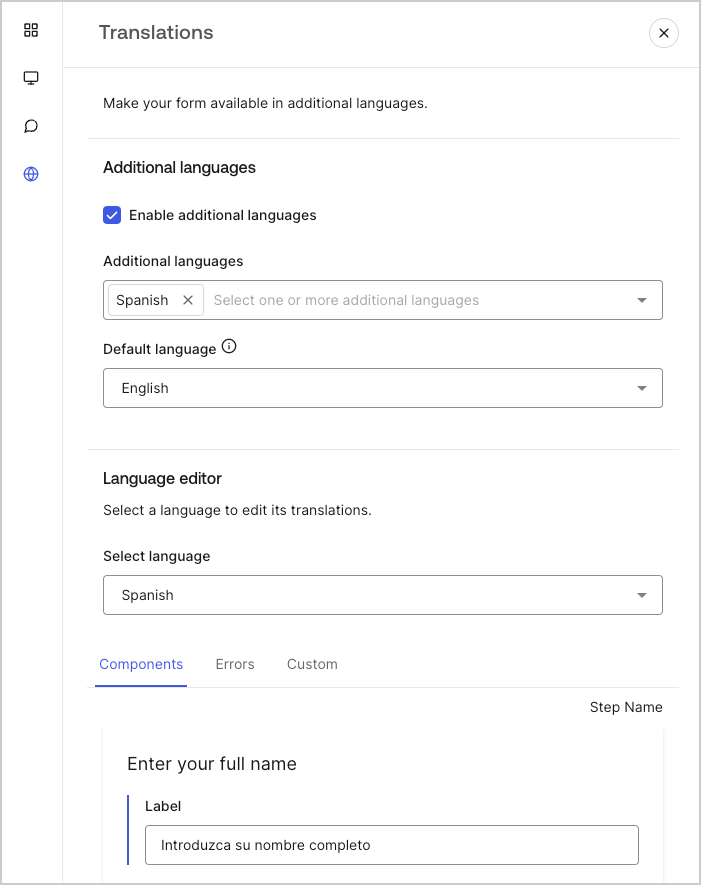
With the language editor, you can define translations for your form components, errors, and other custom messages.

To define your translations, follow the steps below:

1. Select the desired language from theSelect language dropdown menu.
2. Select one of the following tabs to begin defining your translations:

   1. **Components**
   2. **Errors**
   3. **Custom**
3. For each available field, provide your translations as needed.
4. Select **Publish** to save.
<Frame>
  <img src="https://mintcdn.com/docs-dev-actions-triggers-reorg/kNefQmNXVFylVFt5/docs/images/cdy7uua7fh8z/5HY9FA6HZct2XNv5K4pCHY/c5977a7825e15285c3d77c2ca1e299a8/translation-message.png?fit=max&auto=format&n=kNefQmNXVFylVFt5&q=85&s=d355e358a26af6085f9cd49da409fefa" alt="Dashboard > Forms > Custom messages and translations > Translation message" data-og-width="701" width="701" data-og-height="885" height="885" data-path="docs/images/cdy7uua7fh8z/5HY9FA6HZct2XNv5K4pCHY/c5977a7825e15285c3d77c2ca1e299a8/translation-message.png" data-optimize="true" data-opv="3" srcset="https://mintcdn.com/docs-dev-actions-triggers-reorg/kNefQmNXVFylVFt5/docs/images/cdy7uua7fh8z/5HY9FA6HZct2XNv5K4pCHY/c5977a7825e15285c3d77c2ca1e299a8/translation-message.png?w=280&fit=max&auto=format&n=kNefQmNXVFylVFt5&q=85&s=e7dc34f7a35d31218e21ba564e24d72c 280w, https://mintcdn.com/docs-dev-actions-triggers-reorg/kNefQmNXVFylVFt5/docs/images/cdy7uua7fh8z/5HY9FA6HZct2XNv5K4pCHY/c5977a7825e15285c3d77c2ca1e299a8/translation-message.png?w=560&fit=max&auto=format&n=kNefQmNXVFylVFt5&q=85&s=113fa5a6fe5e5cdff3b86d541eece431 560w, https://mintcdn.com/docs-dev-actions-triggers-reorg/kNefQmNXVFylVFt5/docs/images/cdy7uua7fh8z/5HY9FA6HZct2XNv5K4pCHY/c5977a7825e15285c3d77c2ca1e299a8/translation-message.png?w=840&fit=max&auto=format&n=kNefQmNXVFylVFt5&q=85&s=a015abd9bea45f7cc840abfd86071df4 840w, https://mintcdn.com/docs-dev-actions-triggers-reorg/kNefQmNXVFylVFt5/docs/images/cdy7uua7fh8z/5HY9FA6HZct2XNv5K4pCHY/c5977a7825e15285c3d77c2ca1e299a8/translation-message.png?w=1100&fit=max&auto=format&n=kNefQmNXVFylVFt5&q=85&s=adcef1f92ae0230c1763df4ef08c474f 1100w, https://mintcdn.com/docs-dev-actions-triggers-reorg/kNefQmNXVFylVFt5/docs/images/cdy7uua7fh8z/5HY9FA6HZct2XNv5K4pCHY/c5977a7825e15285c3d77c2ca1e299a8/translation-message.png?w=1650&fit=max&auto=format&n=kNefQmNXVFylVFt5&q=85&s=613ffa72f44eaa731d734c378eca7ecf 1650w, https://mintcdn.com/docs-dev-actions-triggers-reorg/kNefQmNXVFylVFt5/docs/images/cdy7uua7fh8z/5HY9FA6HZct2XNv5K4pCHY/c5977a7825e15285c3d77c2ca1e299a8/translation-message.png?w=2500&fit=max&auto=format&n=kNefQmNXVFylVFt5&q=85&s=13564302d288f5f579b418926e24db74 2500w" />
</Frame>
