

 Authenticate
 Manage Users
 Customize
 Auth0 AI
 Platform
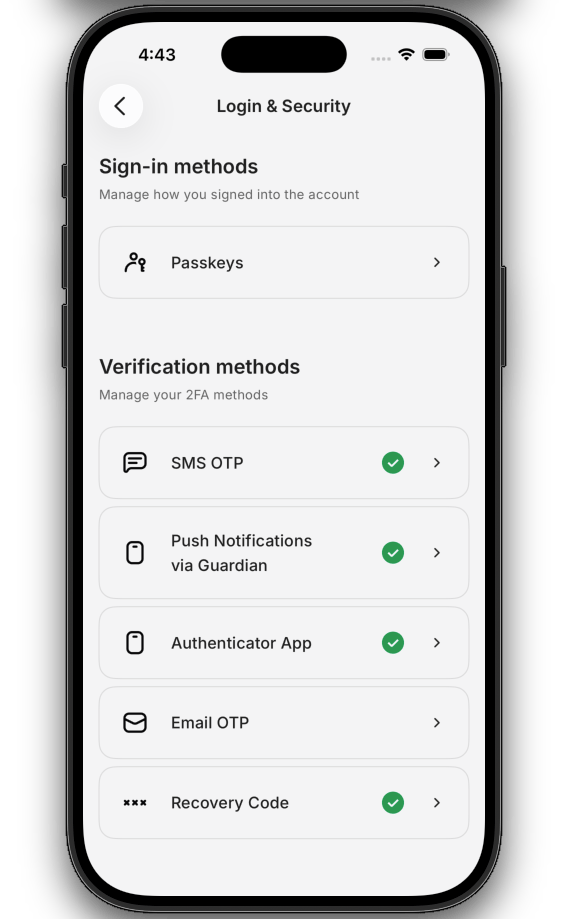
MyAccountAuthMethodsView component, a SwiftUI view that handles every enrollment, verification, listing, and removal flow using the My Account API.
It uses the My Account API’s authentication methods management capabilities to render a complete UI for managing a user’s authentication methods.
With the MyAccountAuthMethodsView component, you do not need to orchestrate navigation, call endpoints, or manage state.
Setup requirements
Before rendering theMyAccountAuthMethodsView component, follow Build a Self-Service Account Security Interface to install the SDK, configure your Auth0 tenant, and initialize the SDK with a token provider.
The
MyAccountAuthMethodsView component reads its configuration, token provider, and passkey settings from the initialized SDK.Supported factors
The component handles every authentication method factor configured with the My Account API. Each factor’s screen inherits the component’s active theme. To learn more, read Customize Style and Themes.Get started
Add theMyAccountAuthMethodsView component anywhere in your SwiftUI hierarchy, typically behind a settings navigation link.
SettingsView.swift
Parameters
TheMyAccountAuthMethodsView component accepts the following modifier and environment values:
Customize
Theming is applied to the component as a whole; individual factor screens inherit the active theme. To learn more about the full token catalog and dark-mode patterns, read Customize Style and Themes.Embed in a host NavigationStack
By default, theMyAccountAuthMethodsView component manages its own NavigationStack.
If your application already owns a navigation stack, nesting a second stack breaks back-button behavior and swipe-to-go-back gestures. Embed the
MyAccountAuthMethodsView component into your stack instead.-
Add the
.embeddedInNavigationStack()modifier to theMyAccountAuthMethodsViewcomponent so it skips creating an inner stack. -
Add the
\.hostNavigationPathmodifier to the outerNavigationStackso the SDK knows which path binding to push onto.
The SDK also exposes a
Router helper class for applications that want a type-safe navigation controller for their own routes.It is not required to drive the SDK’s internal navigation. Only use it if you want to apply the same pattern to your application’s screens.Localization
Universal Components for iOS do not ship localized strings. User-facing copy is in English. If localization is a blocker for your integration, please submit a feature request in the ui-components-ios repository.Limitations
- No standalone factor components on iOS. Every factor renders inside the Authentication Methods Management component. There is no public API to enroll, verify, or remove a single factor from a different part of your application.
- No standalone list/remove components. The SDK does not ship public components for listing enrolled factors or removing them outside the component. Use the Authentication Methods Management component for the full management experience.
Learn more
Build a Self-Service Account Security Interface
Initialize the SDK and wire the token provider to your Auth0 tenant.
Customize style and themes
Override colors, typography, spacing, radius, and size tokens using the Auth0 design-token system.